NZQA Sync
Helix now connects directly to NZQA using a secure REST API. Previously, Helix generated an XML file which schools manually uploaded to the NZQA website. This process has now been replaced with real-time synchronisation using the NZQA SMS API. This change provides: No XML file exports No manual uploads Faster processing Immediate validation and feedback Reduced administrative overhead
To access this screen you need both NZQA API Officer and Principals Nominee rights. You also need to have the ESL machine passphrase entered under Admin\Import/Export\Miscellaneous - NZQA API Credentials
The NZQA Sync screen contains four tabs:
|
Tab |
Purpose |
|
Enrolments |
Sync student enrolment records |
|
Learner Details |
Sync student identity records |
|
Standards |
Sync standard entries and results |
|
Logs |
View sync history and progress |
The status banner at the top shows:
-
Last sync time
-
Current processing progress
-
Summary of changes
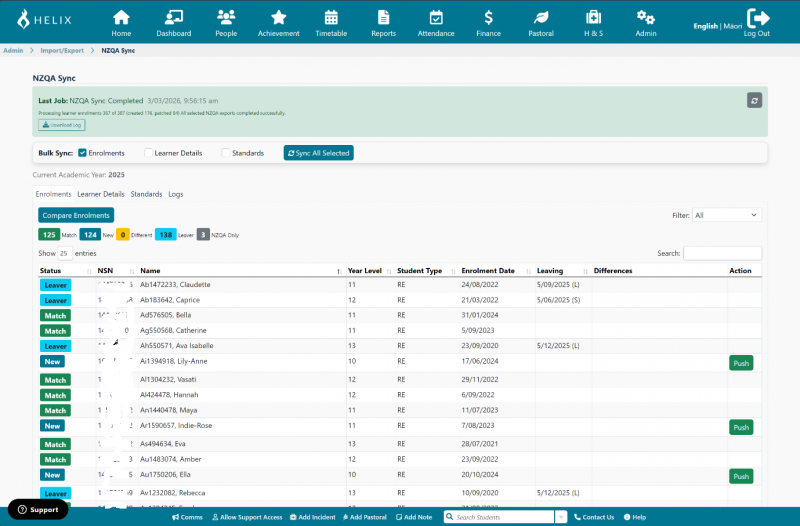
Compare Enrolments
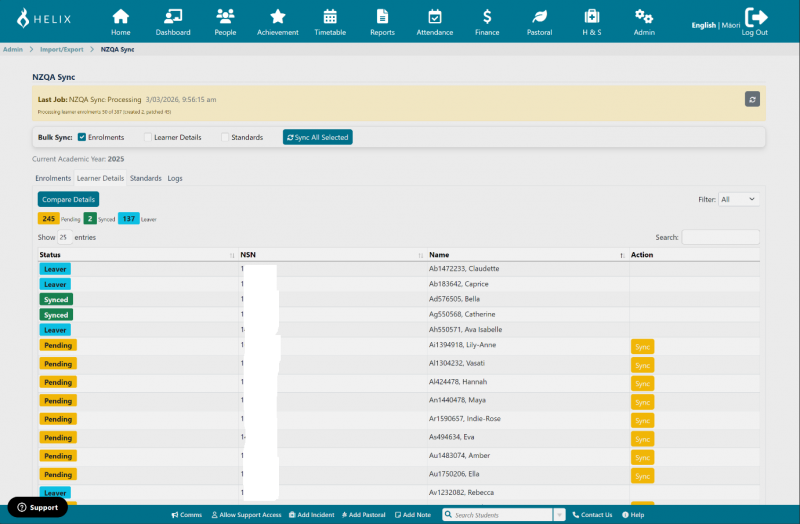
Compare Details
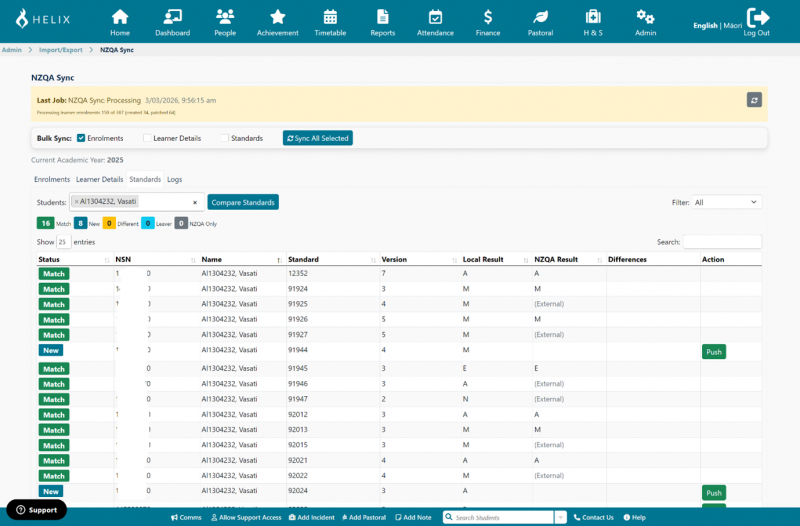
Compare Standards
Helix retrieves current NZQA records and compares them with Helix.
Students will be categorised:
|
Status |
Meaning |
|
Match |
No changes required |
|
New |
Exists in Helix but not NZQA |
|
Different |
Differences detected |
|
Leaver |
Student left school |
|
NZQA Only |
Exists in NZQA but not Helix |
Review
Review the list of changes.
For standards, you will see:
|
Column |
Meaning |
|
Local Result |
Result stored in Helix |
|
NZQA Result |
Result currently held by NZQA |
|
Differences |
Any mismatch |
Sync
You can sync:
Individual students: click Sync or Push
Bulk: click Sync All Selected
Helix will submit changes to NZQA immediately.
Sync Status Indicators
|
Status |
Meaning |
|
Pending |
Not yet synced |
|
Synced |
Successfully sent |
|
Leaver |
Leaving student recorded |
|
Match |
Already identical |
How the API Works (Technical Summary)
When syncing, Helix:
-
Authenticates securely with NZQA
-
Sends changes using the NZQA API
-
NZQA validates and stores the data
-
Returns confirmation or errors
This replaces the previous XML upload and batch processing system.
The API allows:
-
Creating enrolments
-
Updating learner details
-
Creating standard entries
-
Submitting results
Processing occurs immediately instead of waiting for batch processing.
Important Behaviour Changes
No more full file uploads
Previously:
-
Entire school data uploaded
Now:
-
Only changed records are sent
Faster updates
Changes are processed immediately.
Previously processing could take days.
Better transfer handling
When a student moves schools:
Previous system:
-
All entries withdrawn
-
New school re-entered results
New system:
-
Enrolment transferred automatically
-
Results remain intact
Recommended Workflow
Recommended frequency:
-
Daily during peak periods
-
Weekly minimum otherwise
Suggested process:
-
Click Compare
-
Review differences
-
Click Sync
Troubleshooting
If records do not sync, check:
-
Student has a valid NSN
-
Student has an active enrolment
-
Results are entered correctly
Then retry sync.
FAQ
Do I still need to export XML files?
No. This process is now automatic.
Do I still need to upload anything to the NZQA website?
No. Helix sends data directly.
When should I sync?
Regularly, especially:
-
After enrolments change
-
After entering results